Introducing the next evolution of Templafy agents for PowerPoint

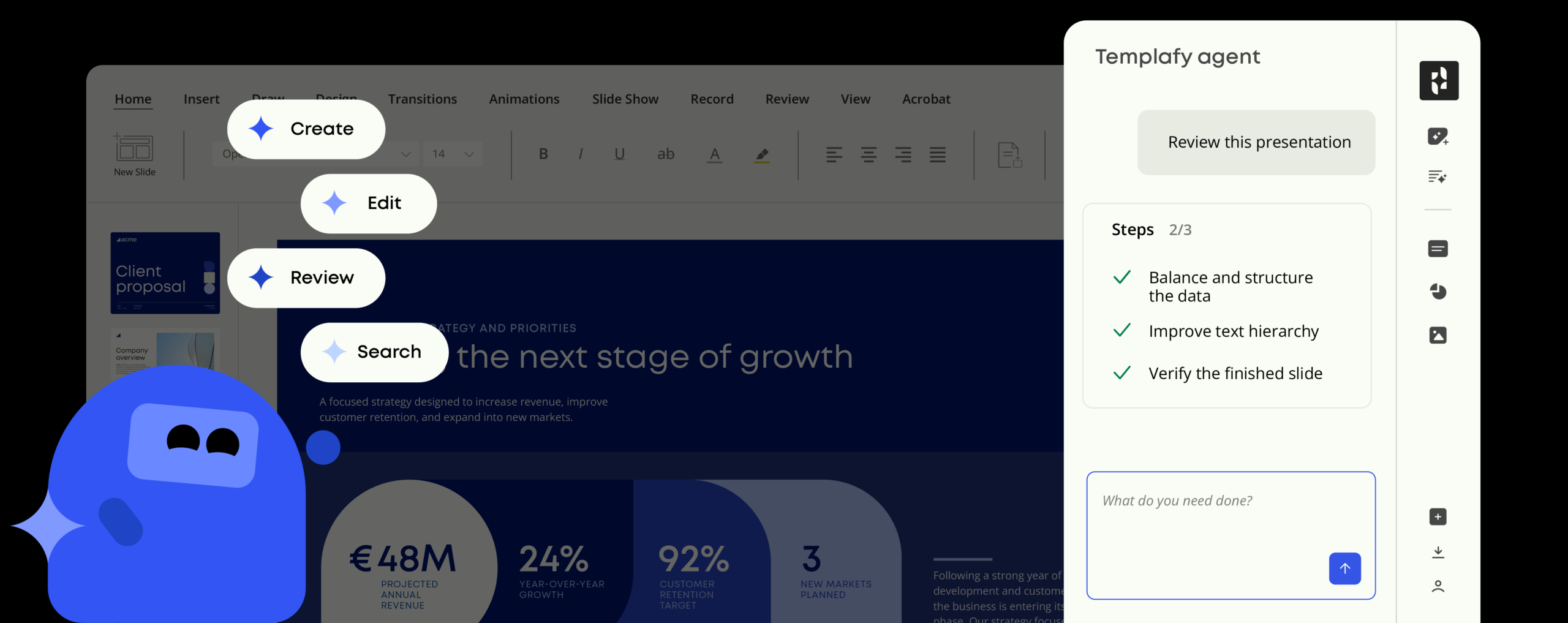
Create, edit, and review presentations without leaving PowerPoint, with Templafy Agent add-in.
We’re expanding the capabilities of Templafy’s document agents and bringing them together in one intuitive, user-friendly experience, making it easier to create, edit and review presentations directly in PowerPoint.
Individual PowerPoint users can download the add-in from Microsoft Marketplace for free to start creating and editing presentations with AI agents through chat.
For Templafy customers, it goes even further. The add-in connects to your approved templates, company-built document agents, content, business data, knowledge, and brand rules, so every document created or edit made doesn’t just look sharp and professional, but automatically reflects the right branding, product information, and company standards without requiring complex prompts or manual configuration.
Here’s everything you need to know to get started.
- Individual users: Download free from Microsoft Marketplace
- Templafy customers: Follow these steps
Why every PowerPoint user needs the Templafy Agent add-in
If creating presentations is part of your day-to-day work, you’re probably already using AI to generate text and slides faster.
LLMs like ChatGPT, Claude, and Perplexity can create PowerPoint presentations, but PowerPoint isn’t their area of expertise. They can help generate content and slides, but the output may still require significant work to get the structure, layout, and formatting right. Some output a PDF that can’t be edited in PowerPoint. Others create a file that looks like a .pptx, but falls apart when you try to update it.
AI presentation tools can also create polished, editable presentations, but they often lack the context that makes a presentation truly company-ready. They may not know which templates to use, how to apply your brand correctly, or which product information, business data, and company standards the presentation should reflect.
PowerPoint isn’t going anywhere. It’s where business presentations get created, shared, and reviewed, often by several people over time. So instead of asking teams to learn another tool or jump between apps, AI should enhance the PowerPoint workflow they already know. That means adding AI capabilities to PowerPoint, instead of replacing it.
True to Templafy’s core design principle, that doesn’t mean your work has to start in PowerPoint. Templafy document agents are available across AI assistants like ChatGPT, Claude, and Microsoft Copilot, so you can start working wherever it makes sense and continue in PowerPoint when it’s time to refine, edit, and finalize your presentation. The Templafy Agent add-in makes that transition seamless by bringing the same agent-powered experience directly into PowerPoint.
The Templafy Agent add-in brings the speed, creativity, and productivity of AI agents into PowerPoint, where people already work. This makes adoption easy because teams don’t need to learn a new tool or change the way they work.
It’s free for anyone to use, but it goes even further for Templafy customers. The add-in connects to approved content libraries, templates, and business data, so every edit can use the right company information, branding, and content.
What can I do with the Templafy Agent add-in?
If PowerPoint can do it, the Templafy agent can do it. Because the Templafy Agent add-in is conversational, you can ask for anything you want (within the constraints of PowerPoint).
Build an entire presentation, add a chart, tweak a slide. Here are just a few example prompts that we think you’ll use often.
Create new slides
Add new, on-brand slides based on the context of the deck you already have and company’s document asset as well as knowledge. The agent works from the presentation in front of it, not from a blank canvas.
Rewrite and customize content
Shorten copy, improve clarity, translate slides, or adapt messaging for a different audience without rewriting everything by hand.
Fix layouts and formatting
Clean up alignment, spacing, and design issues directly in the file, without slide-by-slide manual repair.
Visualize data
Add native PowerPoint charts, tables, and SmartArt, and update them with latest data.
Pull approved content
Templafy customers can bring approved slides, assets, and content into the deck from their governed libraries.
Review before sending
Run a final check before the presentation goes out, to catch mistakes without another manual cleanup round.
For Templafy customers: presentations built with your approved content, data, and brand
This is where the Templafy Agent add-in gets really powerful. Your Microsoft 365 admin can deploy it to the people or groups who need it, so it appears in PowerPoint without everyone having to install it themselves.
Once it’s connected to your Templafy tenant, the agent can work with the things that make your presentations yours: approved templates, layouts, slide libraries, brand rules, product information, and business data.
Users can also search for relevant slides and visuals easily from the agent add-in.
That means the agent isn’t starting from generic AI output. Every slide it creates, edit it makes, and piece of content it adds can draw on information your teams have already approved.
As a Templafy customer, you can:
- Use approved templates and layouts which were used to configure the document agent, so new slides start on brand.
- Pull from approved content libraries to reuse the right slides, assets, and messaging.
- Edit using latest business data so presentations reflect current company information.
- Keep every deck consistent with your brand guidelines and company standards.
It’s an easier way to create polished presentations built around your company’s DNA from the start.
Ready to try the Templafy Agent add-in?
Whether you’re building a deck from scratch, improving a slide, or doing a last-minute review, the Templafy Agent add-in helps you get it done without the work, and without leaving PowerPoint.
Individual PowerPoint users: Download the Templafy Agent add-in free from Microsoft Marketplace.
Templafy customers: Log in to the Templafy Admin Center to deploy the add-in for your teams.
Discover what Templafy can do for your organization
There’s a reason why leading enterprises like KPMG, EY, IKEA, and BDO, use Templafy to create accurate, compliant, and on-brand business content at scale.
Book a personalized walkthrough with a document expert to see how Templafy can bring governed AI into the workflows your teams already use, helping teams create better documents and presentations while keeping AI spend under control.

BLOG
Stop the AI slop: 6 crucial steps to protect your brand in business documents
October, 2026
15 min read
In this blog, we unpack how AI-generated documents can erode what makes your brand distinctive, what it costs when generic content reaches your customers, and six steps to make every document unmistakably yours.
Read more

BLOG
The AI productivity paradox: Why AI drafts still take hours to finish
October, 2026
12 min read
AI is everywhere in the workplace. But despite widespread adoption, enterprises are still struggling to turn AI-generated content into real business value. So what's holding businesses back?
Read more

BLOG
Templafy Talks: 3 takeaways for orchestrating AI document creation
October, 2026
8 min read
How to scale AI without losing control of document quality, compliance, or costs.
Read more