Templafy Talks: 3 takeaways for orchestrating AI document creation


How to scale AI without losing control of document quality, compliance, or costs
Remember the days of staring at a blank page and a flashing cursor?
Hopefully not. Today, you can open your favorite AI assistant, type a prompt, and have a first draft in seconds.
But creating a fast first draft is only part of the job. Turning it into a document the business trusts takes the right company content, data, and controls.
As teams adopt AI assistants for different tasks, enterprises face a bigger challenge: how do you harness those capabilities without creating a separate set of document standards and workflows in every tool?
The answer is document orchestration: a centrally managed governance layer that connects AI assistants, document applications, and company resources. Teams use the tools the business supports, while working from the same approved content, templates, data, and rules.
In this Templafy Talks session, our panel explored how to put that into practice. Here are three takeaways for scaling AI document creation without multiplying governance work, generation costs, or inconsistency.
Explore the full Templafy Talks series
Meet the panel
- John Tiniakos-Rasmussen, Senior Principal, Customer Growth & Experience, Templafy, Denmark, hosted the conversation.
- Madison Hilali-Feinberg, Senior Executive Client Partner, Templafy, USA, shared the customer perspective on adopting and governing enterprise AI.
- Aayush Aggarwal, Senior Solutions Consultant, Templafy, Denmark, demonstrated how governed document creation works across AI assistants.
- David Jackson, Managing Director, Ripped Orange, New Zealand, explored how employees use AI and what that means for organizations.
1. Why can’t organizations just choose one AI assistant and govern that?
For many of us, ChatGPT was our first AI playground. That familiarity doesn’t disappear with a company-wide Copilot rollout. But it’s not just about personal preference: different teams work differently, and different clients have different needs.
Madison sees this among her enterprise customers, where Copilot might be the default assistant, but individual business units also use Claude or some other AI assistant.
For enterprise leaders, choosing a default platform is just the first step. Approved content, business data, branding, and compliance rules still need to follow employees across the tools the business supports. The goal isn’t to make everyone work the same way; it’s to maintain the same standards, wherever work begins.
As David put it:
“If you can’t do it in your work environment with tools that are sanctioned and provided from work, you’ll just do it with your own tools anyway.”

David Jackson,
Managing Director, Ripped Orange
Madison shared a similar challenge from a large accounting and audit firm she works with:
“They have different business units, different service lines, and they service and deliver results to their clients in different ways.”

Madison Hilali-Feinberg,
Senior Executive Client Partner, Templafy
2. What exactly is document orchestration?
If every AI assistant needs its own document controls, you’re giving IT, brand, and compliance teams the same job several times: configure branding in Copilot, set up approved content in Claude, build the proposal workflow somewhere else. Then keep everything updated as company requirements change.
As Madison pointed out:
“Even just from a brand perspective, that duplication creates a huge amount of work. And that’s before you factor in company knowledge, business data, and compliance. Every new AI assistant shouldn’t mean rebuilding the same controls. Those requirements need to be managed centrally, not separately in every assistant.”
Madison Hilali-Feinberg,
Senior Executive Client Partner, Templafy
Document orchestration provides that central layer. It connects AI assistants and document applications to shared templates, company content, business data, and rules, so organizations can manage document requirements once and apply them across connected tools.
It also separates what AI should generate from what should come from approved sources. AI can draft a client proposal, while the company supplies the credentials, pricing, and legal wording. Employees don’t need to recreate those requirements in every prompt.
As Aayush explained:
“You can’t depend on every employee to enforce every requirement, every time they create a document. Those controls need to be built into the workflow. That’s how you scale AI across the business without making brand consistency, accuracy, and compliance depend on who wrote the prompt.”

Aayush Aggarwal,
Senior Solutions Consultant, Templafy
3. How does document orchestration cut AI generation costs?
Why pay AI to recreate content your company has already created and approved?
Employee bios, credentials, case studies, and legal wording already exist. Reusing them reduces token consumption and avoids generating new versions of information that was already correct. AI can focus on research, reasoning, and drafting instead.
As David put it:
“If the approved content already exists, why spend expensive tokens generating it again? Bring it into the document reliably and let AI focus on the work that needs it. You reduce unnecessary cost and give employees more time to focus on the customer.”
David Jackson,
Managing Director, Ripped Orange
Repeated attempts to get a presentation client-ready add to the bill, too. Across an enterprise, that spending becomes difficult to predict. David had a good analogy for the IT managers picking up the tab:
“They’re running an open bar tab, and they don’t know what it’s gonna be at the end of the night.”
David Jackson,
Managing Director, Ripped Orange
Madison shared customer examples of spending $10–$25 per presentation with Claude alone, with reported reductions of around 40–60% when Templafy was added. These were customer observations, not guaranteed savings.
Beyond the token savings, reusing approved content also means fewer errors, less rework, and more reliable documents.
How Templafy puts document orchestration into practice
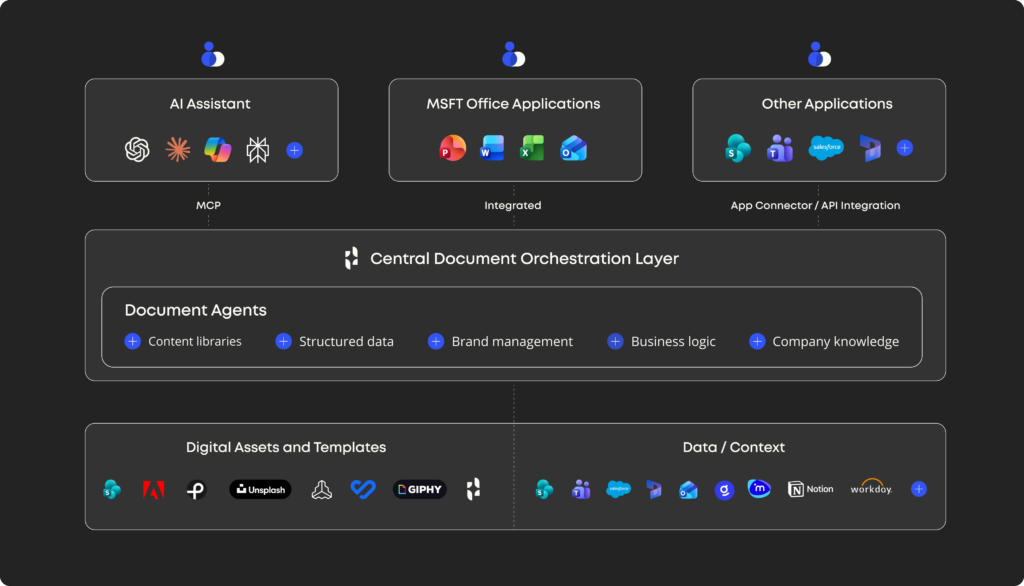
As Madison explains, Templafy isn’t another AI assistant. It’s the orchestration layer connecting the tools employees already use to the company resources behind their documents.
“We’re not trying to create another AI tool that employees have to learn or decide when to use. Templafy sits above the AI systems and workflows already in place, connecting them to the approved content, data, and document processes the business needs. Employees can keep working in their preferred tools, while the organization maintains control over the output.”
Madison Hilali-Feinberg,
Senior Executive Client Partner, Templafy
To demonstrate, Aayush pulled up a split screen with Claude on one side and Microsoft Copilot on the other. He gave both assistants the same task: create a sales proposal for an opportunity in Salesforce.
Through Templafy’s MCP server, both assistants accessed the same Document Agent. The agent retrieved the Salesforce opportunity, offered approved presentation designs, and assembled the proposal using company templates and content.
AI helped develop the proposal, but team bios, accreditations, and pricing came directly from approved company resources and Salesforce. The two presentations weren’t identical, but both met the same brand and document requirements.
Aayush then opened the presentation in PowerPoint and asked the Document Agent to add a slide justifying the proposed fee. Using the existing presentation and connected business data, the agent created the slide within the approved design.
One governed document workflow, available across different AI assistants and PowerPoint. Employees can create and edit documents where they already work, while Templafy handles the company requirements behind the scenes.
But wait, there’s more
Want to see how organizations can embrace AI-powered document creation without losing control?
The full webinar recording takes a deeper dive into how Templafy helps organizations orchestrate document creation across AI assistants and Microsoft Office, giving employees the freedom to work where they choose while maintaining consistency, quality, and control.
You’ll discover:
- Why more AI tools and entry points make document consistency, quality, and cost harder to manage
- How to support employees working across ChatGPT, Claude, Copilot, and Microsoft Office
- How Templafy connects AI workflows with approved company knowledge, content, templates, and rules
- How reusing existing content can reduce unnecessary AI generation and help control costs
- How to maintain centralized governance while enabling flexible, AI-powered document creation
Watch the webinar on demand to see how it all works in practice.
Ready to generate a compliant PowerPoint?
The best way to understand why leading enterprises like KPMG, IKEA, and BDO trust Templafy is to see it in action.
Book a demo with our document experts to see how your company content, business data, and document rules come together to create accurate, compliant, and on-brand documents across the tools your teams already use.
Or try the free Templafy Agent add-in to create, edit, and review presentations through chat, without leaving PowerPoint.
Try Templafy from:




BLOG
6 common errors hiding in your AI-generated PowerPoint
October, 2026
9 min read
How to keep AI-generated presentations accurate, consistent, and client-ready.
Read more

BLOG
Gartner® just named Templafy a Cool Vendor in 2026 Coolest Vendor Innovations in Digital Workplace Applications
October, 2026
7 min read
AI is everywhere in the enterprise. So why are leaders still finding it difficult to turn adoption into meaningful productivity gains? This is exactly the challenge Gartner examines in its recent report, Coolest Vendor Innovations in Digital Workplace Applications.
Read more
BLOG
Beyond the First Draft: Closing the AI Productivity Gap
October, 2026
6 min read
‘The Business-Ready AI Gap 2026’, Templafy’s new report based on a survey of 2,000 knowledge workers who use AI to create business documents at least once a month in the UK and US, alongside Templafy platform data, reveals the gap between a first AI-generated draft and something that’s ready to share.
Read more